 New to Shopify? Free trial, then $1/month for your first 3 months. Start free trial →
 Where is your store?
Ryviu works with both – pick yours to continue.








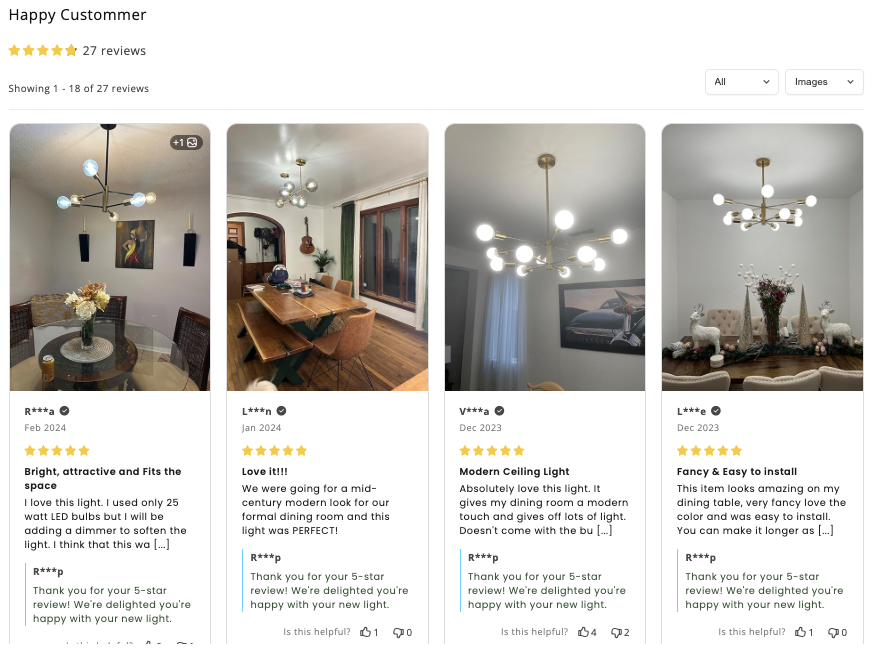
In the world of eCommerce, reviews have evolved far beyond text. Today, shoppers crave authenticity — they want to see real people using real products in real-life settings. Product review photos are now one of the most powerful forms of social proof. They bridge the gap between professional product photography and user experience, offering future buyers a window into what they can actually expect. But not all review photos are equal. The difference between an ordinary image and a perfect review photo can determine whether it convinces others to purchase or gets lost among hundreds of other reviews.
This guide explores five practical tips to help you (or your customers) share the perfect product review photos — pictures that not only reflect honesty but also highlight the product beautifully. Whether you’re a Shopify seller encouraging user-generated content (UGC) or a shopper who loves sharing experiences, these techniques will help create visuals that inspire confidence and trust.
Before diving into the practical tips, it’s important to understand why review photos carry such weight. Online shoppers don’t get to touch, feel, or try products before purchasing — so they rely on visuals to make confident decisions. A product description might sound promising, but a real photo from a real person feels like undeniable proof. It shows how the product looks in real lighting, fits into daily life, and performs outside of studio conditions.
Studies show that listings with photo reviews can increase conversions by up to 30%. People don’t just want to know if a product “works” — they want to see how it looks on someone like them. This is especially true for apparel, home décor, beauty, and lifestyle products, where visual context drives emotional connection.
Perfect product review photos are not about perfection in a technical sense. They’re about believability, clarity, and storytelling. With that in mind, let’s explore the five core tips that can help transform a simple snapshot into a trust-building visual.
Light can make or break any photo. When shoppers browse reviews, they’re subconsciously analyzing lighting — is it bright and natural, or dim and artificial? Natural light not only enhances the product’s appearance but also conveys transparency. It reassures future buyers that the colors and textures they see are real, not filtered or exaggerated.
Whenever possible, use daylight near a window or shoot outdoors in indirect sunlight. Morning or late afternoon light tends to be soft and flattering. Avoid using the camera flash, as it can create harsh shadows or distort the color tone of the product.
The goal isn’t just brightness but clarity. To get this right:
For small items like accessories, candles, or gadgets, you can use a piece of white paper or cardboard to reflect natural light back onto the product and remove unwanted shadows.
Good lighting doesn’t require professional gear — it just needs awareness of how natural light behaves. The more evenly lit and natural your product looks, the more trustworthy your review photo feels.
A perfect review photo should draw attention to the product, not the surroundings. Clutter, distractions, or irrelevant backgrounds can make it harder for other shoppers to focus. Clean, simple compositions instantly communicate professionalism and make your photo easier to trust.
That doesn’t mean you should shoot against a plain white wall every time — context can add value. But context should support the product’s story, not overshadow it. For example, showing a mug on a cozy desk setup makes sense, but showing it surrounded by random household clutter doesn’t.
To achieve balanced composition:
Simple, focused composition ensures that when others scroll through reviews, their eyes land directly on what matters — the product itself.
Nothing builds trust faster than showing how a product fits into real life. Static product photos show what it is; lifestyle review photos show what it does. When shoppers see an item being used naturally, they can visualize themselves using it too.
For example:
These subtle details bring emotion and warmth to the photo, transforming it from a simple review to a story.
To make your photo feel genuine:
Brands thrive on this kind of user-generated content because it feels spontaneous. It connects emotionally, encouraging others to buy with confidence because they can see how the product blends seamlessly into someone’s life.
Perfect review photos are not about hiding flaws. In fact, showing textures, materials, and even minor imperfections creates a sense of honesty that buyers appreciate. Shoppers want to know: Is the fabric thick? Is the print vivid? Is the finish smooth or matte? Close-up shots that reveal these qualities answer those questions directly.
Zooming in on texture helps online buyers make informed choices. It’s especially important for clothing, art prints, furniture, and handmade goods — items where physical feel matters as much as appearance.
When taking detail shots:
These small but powerful details create a layer of trust that no marketing image can match. They tell future buyers, “Here’s what it really looks like,” and that honesty goes a long way in eCommerce credibility.
Photo editing isn’t a crime — in fact, a few subtle adjustments can make your review photos clearer and more professional. However, the goal should always be enhancement, not manipulation. Editing should bring the photo closer to what your eyes saw in real life.
When lightly editing:
Remember: future customers compare what they receive to the review photos they saw. Over-editing leads to disappointment and reduces credibility — the exact opposite of what you want your review to achieve.
If you’re editing on mobile, apps like Snapseed, Lightroom Mobile, or VSCO offer great control without heavy filters. Stick to tools that let you adjust exposure, white balance, and sharpness with precision. For brands collecting UGC, automatic moderation tools can detect over-filtered or low-quality images to maintain consistency across reviews.
Ultimately, a perfect review photo feels honest. It enhances visibility and clarity while preserving the real look and mood of the product.
For eCommerce businesses, getting customers to share photos is an art of its own. Encouraging them effectively can multiply your social proof library. Brands can:
This creates a loop of engagement — customers feel valued, while new buyers gain authentic visuals that drive trust.
Ensure your review submission process is simple and mobile-friendly. The easier it is to upload photos directly from a phone, the more likely users will participate. Using review management tools (like Ryviu app) helps automate requests, verify authenticity, and display photos beautifully on product pages.
Behind every review photo is a story — an expression of satisfaction, pride, or excitement. When customers share photos, they’re not just helping others shop; they’re contributing to a brand community. Each photo becomes a visual testimonial, reinforcing shared experiences among real people.
A strong collection of photo reviews tells a bigger story about your brand’s reliability, design, and customer care. Over time, these visuals form a mosaic of trust that no paid ad can replicate. They speak to potential buyers more loudly than slogans or influencer endorsements ever could.
Perfect product review photos don’t come from expensive equipment or professional studios — they come from authenticity, good lighting, and an honest desire to share real experiences. Whether you’re a customer uploading a photo or a brand encouraging UGC, these five tips — using natural light, keeping the composition simple, showing the product in use, highlighting details, and editing lightly — can transform ordinary snapshots into powerful trust-building visuals.
In a marketplace where authenticity drives conversions, review photos serve as the bridge between marketing and reality. They don’t just show what the product looks like; they show how it feels to own it. And that feeling — genuine, relatable, and human — is what turns browsers into believers and shoppers into loyal fans.




