 New to Shopify? Free trial, then $1/month for your first 3 months. Start free trial →
 Where is your store?
Ryviu works with both – pick yours to continue.









Website speed plays a critical role in eCommerce success. Shoppers expect product pages to load instantly, especially on mobile devices, and even a one-second delay can lead to higher bounce rates and lost sales. Lazy loading has become a popular performance optimization technique that helps eCommerce stores load faster without sacrificing rich visuals or functionality. Understanding how lazy loading works, where to apply it, and how to implement it correctly can significantly improve both user experience and conversions.

Lazy loading is a technique that delays the loading of non-critical resources until they are actually needed. Instead of loading all images, videos, and scripts as soon as a page opens, lazy loading prioritizes visible content and defers the rest until the user scrolls or interacts with the page. This approach reduces initial page load time and minimizes unnecessary data usage.
For eCommerce stores, this is especially valuable because product pages often contain multiple images, reviews, recommendations, and tracking scripts. By loading only what’s immediately visible, shoppers can start browsing faster, creating a smoother first impression that encourages them to stay and explore.
Speed directly affects shopper behavior. When pages load slowly, users are more likely to abandon the site before engaging with products or adding items to their cart. Lazy loading helps eCommerce stores strike a balance between visually rich content and performance efficiency.
Beyond speed, lazy loading also improves perceived performance. Even if all content hasn't been loaded yet, users feel the site is faster because the main elements appear immediately. This perceived responsiveness builds trust and reduces frustration, especially on mobile connections or slower networks.
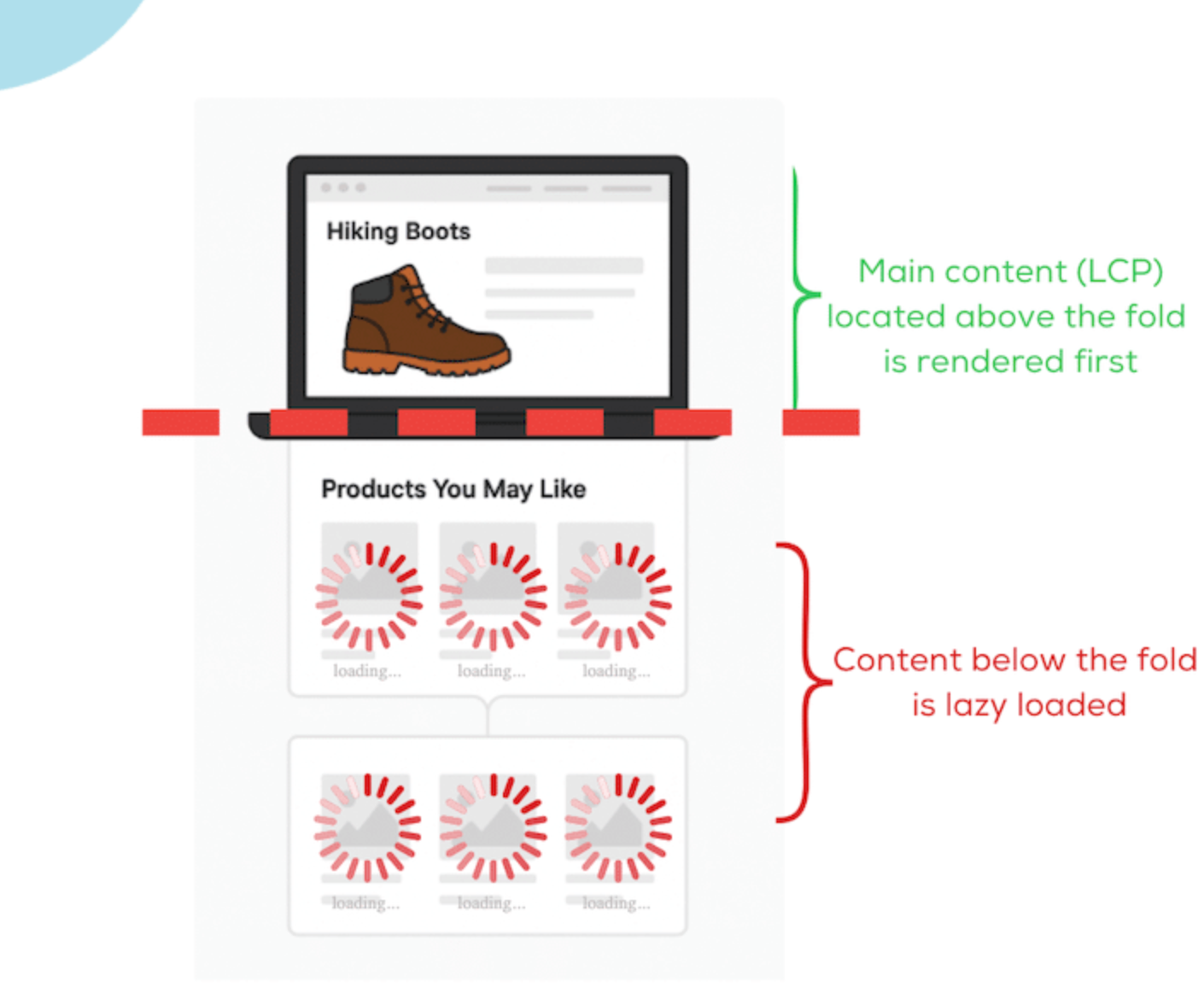
Lazy loading typically relies on detecting when an element enters the user’s viewport. When a user scrolls down the page, images or content blocks that come into view are loaded dynamically. Modern browsers support native lazy loading for images and iframes, while more advanced implementations use JavaScript libraries or Intersection Observer APIs for greater control.
For eCommerce sites, lazy loading often applies to product images, thumbnails, customer reviews, related products, and media-heavy sections. The key is to ensure essential elements load immediately while secondary content loads progressively.
Lazy loading is most effective when applied strategically. Some areas benefit greatly from delayed loading, while others should always load immediately to avoid harming conversions.
Collection and category pages often display dozens of product images. Lazy loading these images allows shoppers to see above-the-fold products quickly while images further down load as they scroll. This creates a smoother browsing experience and reduces initial load time.
Product pages usually include multiple images, zoomed views, videos, reviews, and recommendations. Lazy loading secondary images, review sections, and “related products” helps prioritize the main product image and purchase information. This ensures users can evaluate and buy without waiting for every asset to load.
Hero banners, featured collections, testimonials, and blog sections can benefit from lazy loading. By focusing on the primary message and call-to-action first, eCommerce brands guide users toward engagement before loading supporting content.
Third-party widgets, such as review platforms or social proof tools, can significantly slow down pages. Lazy loading these elements prevents them from blocking critical content while still making them available when users scroll.
Lazy loading can impact SEO positively or negatively depending on how it is implemented. Search engines need to access and render images, text, and dynamic elements to understand page content correctly. If lazy-loaded assets are hidden from crawlers or require excessive interaction to appear, important content may not be indexed.
That’s why eCommerce sites must balance performance optimization with search visibility to avoid unintended ranking issues.
Mobile shoppers are far less tolerant of slow-loading pages due to limited bandwidth and smaller screens. Every additional second of load time increases frustration and abandonment, especially on product and category pages. Lazy loading helps mobile users access key content faster without downloading unnecessary assets upfront.
However, mobile behavior introduces new challenges that require careful tuning of lazy loading settings.
Lazy loading becomes harmful when it interferes with essential shopping actions. Delaying the loading of core elements like the main product image or add-to-cart button can reduce trust and slow decision-making. Layout shifts caused by missing image dimensions also disrupt the browsing experience and frustrate users.
To prevent these issues, lazy loading must be applied selectively rather than universally.
Effective lazy loading focuses on improving speed without sacrificing clarity or usability. Above-the-fold content should always load instantly to establish trust and guide users toward action. Visual placeholders help maintain layout stability while deferred content loads in the background.
When implemented correctly, lazy loading becomes part of a cohesive performance strategy rather than a standalone fix.
Page speed plays a direct role in conversion rates throughout the eCommerce funnel. Faster loading encourages users to browse longer, view more products, and progress confidently toward checkout. Lazy loading removes unnecessary friction by delivering content progressively instead of all at once.
As a result, performance improvements quietly support higher engagement and stronger purchase intent.
Lazy loading is a core part of modern eCommerce experience design. By loading content only when it’s needed, eCommerce stores can deliver faster, smoother, and more engaging shopping journeys without sacrificing visual quality.
When implemented thoughtfully and tested thoroughly, lazy loading helps eCommerce brands meet shopper expectations, improve performance metrics, and ultimately increase conversions. As competition continues to grow, mastering techniques like lazy loading can give your store a meaningful edge.




